Socket Communication for Continuous Data Stream Between Mobile and Server
Sending and Receiving Data with Sockets in android
This example demonstrate about Sending and Receiving Data with Sockets in android
Need Server and Client Project
Server
Step 1 − Create a new project in Android Studio, go to File ⇒ New Project and fill all required details to create a new project.
Step 2 − Add the following code to res/layout/activity_main.xml.
<?xml version = "1.0" encoding = "utf-8"?> <RelativeLayout xmlns:android = "http://schemas.android.com/apk/res/android" xmlns:tools = "http://schemas.android.com/tools" android:layout_width = "match_parent" android:layout_height = "match_parent" android:layout_margin = "16dp" tools:context = ".MainActivity"> <TextView android:id = "@+id/tvIP" android:layout_width = "wrap_content" android:layout_height = "wrap_content" android:textAppearance = "@style/Base.TextAppearance.AppCompat.Medium" /> <TextView android:id = "@+id/tvPort" android:layout_width = "wrap_content" android:layout_height = "wrap_content" android:layout_below = "@+id/tvIP" android:textAppearance = "@style/Base.TextAppearance.AppCompat.Medium" /> <TextView android:id = "@+id/tvConnectionStatus" android:layout_width = "match_parent" android:layout_height = "wrap_content" android:layout_below = "@+id/tvPort" android:textAppearance = "@style/Base.TextAppearance.AppCompat.Medium" /> <TextView android:id = "@+id/tvMessages" android:layout_width = "match_parent" android:layout_height = "wrap_content" android:layout_above = "@+id/etMessage" android:layout_below = "@+id/tvConnectionStatus" android:inputType = "textMultiLine" android:textAppearance = "@style/Base.TextAppearance.AppCompat.Medium" /> <EditText android:id = "@+id/etMessage" android:layout_width = "match_parent" android:layout_height = "wrap_content" android:layout_above = "@+id/btnSend" android:hint = "Enter Message" android:inputType = "text" /> <Button android:id = "@+id/btnSend" android:layout_width = "match_parent" android:layout_height = "wrap_content" android:layout_alignParentBottom = "true" android:text = "SEND" /> </RelativeLayout>
Step 3 − Add the following code to src/MainActivity.java
package com.server.myapplication.server; import android.annotation.SuppressLint; import android.net.wifi.WifiInfo; import android.net.wifi.WifiManager; import android.os.Bundle; import android.support.v7.app.AppCompatActivity; import android.view.View; import android.widget.Button; import android.widget.EditText; import android.widget.TextView; import java.io.BufferedReader; import java.io.IOException; import java.io.InputStreamReader; import java.io.PrintWriter; import java.net.InetAddress; import java.net.ServerSocket; import java.net.Socket; import java.net.UnknownHostException; import java.nio.ByteBuffer; import java.nio.ByteOrder;  @SuppressLint("SetTextI18n") public class MainActivity extends AppCompatActivity {    ServerSocket serverSocket;    Thread Thread1 = null;    TextView tvIP, tvPort;    TextView tvMessages;    EditText etMessage;    Button btnSend;    public static String SERVER_IP = "";    public static final int SERVER_PORT = 8080;    String message;    @Override    protected void onCreate(Bundle savedInstanceState) {       super.onCreate(savedInstanceState);       setContentView(R.layout.activity_main);       tvIP = findViewById(R.id.tvIP);       tvPort = findViewById(R.id.tvPort);       tvMessages = findViewById(R.id.tvMessages);       etMessage = findViewById(R.id.etMessage);       btnSend = findViewById(R.id.btnSend);       try {          SERVER_IP = getLocalIpAddress();       } catch (UnknownHostException e) {          e.printStackTrace();       }       Thread1 = new Thread(new Thread1());       Thread1.start();       btnSend.setOnClickListener(new View.OnClickListener() {          @Override          public void onClick(View v) {             message = etMessage.getText().toString().trim();             if (!message.isEmpty()) {                new Thread(new Thread3(message)).start();             }          }       });    }    private String getLocalIpAddress() throws UnknownHostException {       WifiManager wifiManager = (WifiManager) getApplicationContext().getSystemService(WIFI_SERVICE);       assert wifiManager ! = null;       WifiInfo wifiInfo = wifiManager.getConnectionInfo();       int ipInt = wifiInfo.getIpAddress();       return InetAddress.getByAddress(ByteBuffer.allocate(4).order(ByteOrder.LITTLE_ENDIAN).putInt(ipInt).array()).getHostAddress();    }    private PrintWriter output;    private BufferedReader input;    class Thread1 implements Runnable {       @Override       public void run() {          Socket socket;          try {             serverSocket = new ServerSocket(SERVER_PORT);             runOnUiThread(new Runnable() {                @Override                public void run() {                   tvMessages.setText("Not connected");                   tvIP.setText("IP: " + SERVER_IP);                   tvPort.setText("Port: " + String.valueOf(SERVER_PORT));                }             });             try {                socket = serverSocket.accept();                output = new PrintWriter(socket.getOutputStream());                input = new BufferedReader(new InputStreamReader(socket.getInputStream()));                runOnUiThread(new Runnable() {                   @Override                   public void run() {                      tvMessages.setText("Connected
");                   }                });                new Thread(new Thread2()).start();             } catch (IOException e) {                e.printStackTrace();             }          } catch (IOException e) {             e.printStackTrace();          }       }    }    private class Thread2 implements Runnable {       @Override       public void run() {          while (true) {             try {                final String message = input.readLine();                if (message ! = null) {                   runOnUiThread(new Runnable() {                      @Override                      public void run() {                         tvMessages.append("client:" + message + "
");                      }                   });                } else {                   Thread1 = new Thread(new Thread1());                   Thread1.start();                   return;                }             } catch (IOException e) {                e.printStackTrace();             }          }         }    }    class Thread3 implements Runnable {       private String message;       Thread3(String message) {          this.message = message;       }       @Override       public void run() {          output.write(message);          output.flush();          runOnUiThread(new Runnable() {             @Override             public void run() {                tvMessages.append("server: " + message + "
");                etMessage.setText("");             }          });       }    } }
Step 4 − Add the following code to androidManifest.xml
<?xml version = "1.0" encoding = "utf-8"?> <manifest xmlns:android = "http://schemas.android.com/apk/res/android" package = "com.example.myapplication"> <uses-permission android:name = "android.permission.ACCESS_WIFI_STATE" /> <uses-permission android:name = "android.permission.ACCESS_NETWORK_STATE" /> <uses-permission android:name = "android.permission.INTERNET"/> <application android:allowBackup = "true" android:icon = "@mipmap/ic_launcher" android:label = "@string/app_name" android:roundIcon = "@mipmap/ic_launcher_round" android:supportsRtl = "true" android:theme = "@style/AppTheme"> <activity android:name = ".MainActivity" android:label = "Server"> <intent-filter> <action android:name = "android.intent.action.MAIN" /> <category android:name = "android.intent.category.LAUNCHER" /> </intent-filter> </activity> </application> </manifest>
Client
Step 1 − Create a new project in Android Studio, go to File ⇒ New Project and fill all required details to create a new project.
Step 2 − Add the following code to res/layout/activity_main.xml.
<?xml version = "1.0" encoding = "utf-8"?> <RelativeLayout xmlns:android = "http://schemas.android.com/apk/res/android" xmlns:tools = "http://schemas.android.com/tools" android:layout_width = "match_parent" android:layout_height = "match_parent" android:layout_margin = "16dp" tools:context = ".MainActivity"> <EditText android:id = "@+id/etIP" android:layout_width = "match_parent" android:layout_height = "wrap_content" android:hint = "IP-Address" android:inputType = "text" /> <EditText android:id = "@+id/etPort" android:layout_width = "match_parent" android:layout_height = "wrap_content" android:layout_below = "@+id/etIP" android:hint = "Port No" android:inputType = "number" /> <Button android:id = "@+id/btnConnect" android:layout_width = "match_parent" android:layout_height = "wrap_content" android:layout_below = "@+id/etPort" android:layout_gravity = "center" android:layout_marginTop = "16dp" android:text = "Connect To Server" /> <TextView android:id = "@+id/tvMessages" android:layout_width = "match_parent" android:layout_height = "wrap_content" android:layout_above = "@+id/etMessage" android:layout_below = "@+id/btnConnect" android:inputType = "textMultiLine" android:textAppearance = "@style/Base.TextAppearance.AppCompat.Medium" /> <EditText android:id = "@+id/etMessage" android:layout_width = "match_parent" android:layout_height = "wrap_content" android:layout_above = "@+id/btnSend" android:hint = "Enter Message" android:inputType = "text" /> <Button android:id = "@+id/btnSend" android:layout_width = "match_parent" android:layout_height = "wrap_content" android:layout_alignParentBottom = "true" android:text = "SEND" /> </RelativeLayout>
Step 3 − Add the following code to res/layout/MainActivity.java.
package com.client.myapplication.client; import android.annotation.SuppressLint; import android.os.Bundle; import android.support.v7.app.AppCompatActivity; import android.view.View; import android.widget.Button; import android.widget.EditText; import android.widget.TextView; import java.io.BufferedReader; import java.io.IOException; import java.io.InputStreamReader; import java.io.PrintWriter; import java.net.Socket;  @SuppressLint("SetTextI18n") public class MainActivity extends AppCompatActivity {    Thread Thread1 = null;    EditText etIP, etPort;    TextView tvMessages;    EditText etMessage;    Button btnSend;    String SERVER_IP;    int SERVER_PORT;    @Override    protected void onCreate(Bundle savedInstanceState) {       super.onCreate(savedInstanceState);       setContentView(R.layout.activity_main);       etIP = findViewById(R.id.etIP);       etPort = findViewById(R.id.etPort);       tvMessages = findViewById(R.id.tvMessages);       etMessage = findViewById(R.id.etMessage);       btnSend = findViewById(R.id.btnSend);       Button btnConnect = findViewById(R.id.btnConnect);       btnConnect.setOnClickListener(new View.OnClickListener() {          @Override          public void onClick(View v) {             tvMessages.setText("");             SERVER_IP = etIP.getText().toString().trim();             SERVER_PORT = Integer.parseInt(etPort.getText().toString().trim());             Thread1 = new Thread(new Thread1());             Thread1.start();          }       });       btnSend.setOnClickListener(new View.OnClickListener() {          @Override          public void onClick(View v) {             String message = etMessage.getText().toString().trim();             if (!message.isEmpty()) {                new Thread(new Thread3(message)).start();             }          }       });    }    private PrintWriter output;    private BufferedReader input;    class Thread1 implements Runnable {       public void run() {          Socket socket;          try {             socket = new Socket(SERVER_IP, SERVER_PORT);             output = new PrintWriter(socket.getOutputStream());             input = new BufferedReader(new InputStreamReader(socket.getInputStream()));             runOnUiThread(new Runnable() {                @Override                public void run() {                   tvMessages.setText("Connected
");                }             });             new Thread(new Thread2()).start();          } catch (IOException e) {          e.printStackTrace();          }       }    }    class Thread2 implements Runnable {       @Override       public void run() {          while (true) {             try {                final String message = input.readLine();                if (message ! = null) {                   runOnUiThread(new Runnable() {                      @Override                      public void run() {                         tvMessages.append("server: " + message + "
");                      }                   });                } else {                   Thread1 = new Thread(new Thread1());                   Thread1.start();                   return;                }             } catch (IOException e) {                e.printStackTrace();             }          }       }    }    class Thread3 implements Runnable {       private String message;       Thread3(String message) {          this.message = message;       }       @Override       public void run() {          output.write(message);          output.flush();          runOnUiThread(new Runnable() {               @Override             public void run() {                tvMessages.append("client: " + message + "
");                etMessage.setText("");             }          });       }    } }
Step 4 − Add the following code to androidManifest.xml
<?xml version = "1.0" encoding = "utf-8"?> <manifest xmlns:android = "http://schemas.android.com/apk/res/android" package = "com.client.myapplication.client"> <uses-permission android:name = "android.permission.INTERNET" /> <uses-permission android:name = "android.permission.ACCESS_NETWORK_STATE" /> <application android:allowBackup = "true" android:icon = "@mipmap/ic_launcher" android:label = "@string/app_name" android:roundIcon = "@mipmap/ic_launcher_round" android:supportsRtl = "true" android:theme = "@style/AppTheme"> <activity android:name = "com.client.myapplication.client.MainActivity" android:label = "Client"> <intent-filter> <action android:name = "android.intent.action.MAIN" /> <category android:name = "android.intent.category.LAUNCHER" /> </intent-filter> </activity> </application> </manifest>
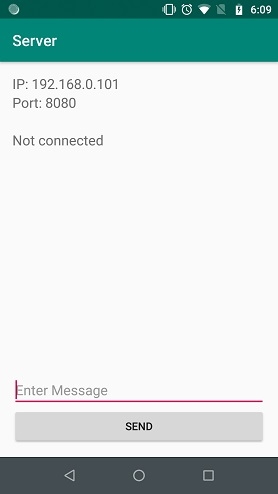
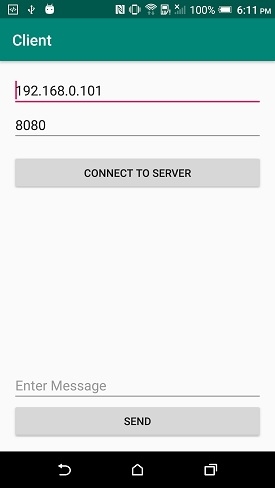
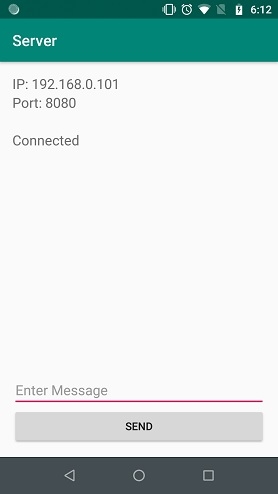
Let's try to run your both server and client application. I assume you have connected your actual Android Mobile device with your computer. To run the app from android studio, open one of your project's activity files and click Run icon from the toolbar. Select your mobile device as an option and then check your mobile device which will display your default screen –
Server:-
Client:-
Server:-
Click here to download the project code

Updated on 30-Jul-2019 22:30:25
- Related Questions & Answers
- Interprocess Communication with Sockets
- Sending message through WhatsApp in android?
- What is Sockets?
- How to play a custom sound on receiving notification in Android?
- How to open an activity after receiving a PUSH notification in Android?
- Display a custom alert or a view on receiving a notification in Android
- How to use sockets in JavaScriptHTML?
- Sending an Attachment with email using Perl
- Sending an Intent to browser to open specific URL in Android?
- jQuery Mobile: Sending data from one page to the another
- Sending Http Requests in ReactJS
- Sending large files over internet
- How to specify the HTTP method to use when sending form-data in HTML?
- How to share app data with other applications in android?
- Sending a Plain Message using Perl
Source: https://www.tutorialspoint.com/sending-and-receiving-data-with-sockets-in-android
0 Response to "Socket Communication for Continuous Data Stream Between Mobile and Server"
Post a Comment